
Apple documents two external displays on MacBook Air M3 with the lid closed, macOS Sonoma 14.3 or later, power, and an external keyboard plus mouse or trackpad. Opening the lid disconnects the secondary external display. This host rule does not verify any particular dock.
Component documentation · Not physically tested by NYBreaking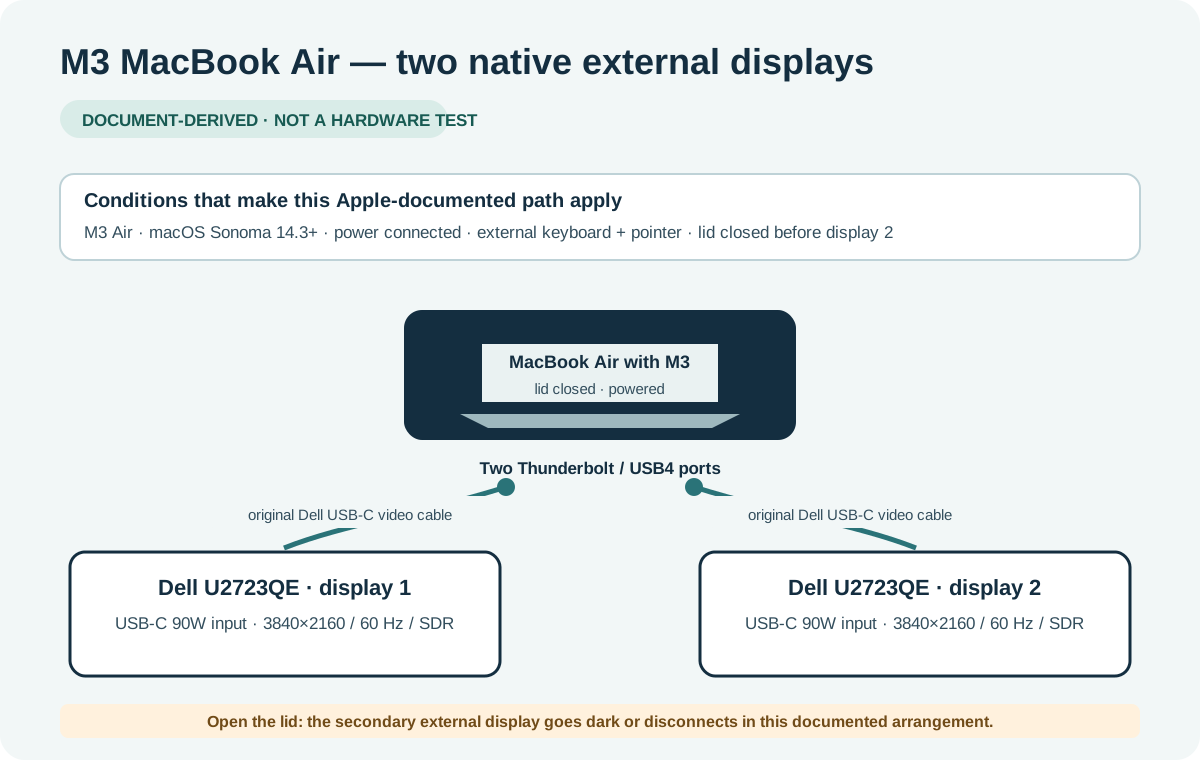
The four requirements to check first
- Correct model: MacBook Air with M3. Do not transfer this rule to an M1/M2 Air or a different MacBook Pro.
- Software: Apple specifies macOS Sonoma 14.3 or later for the Air.
- Power: connect an appropriate power source. A supported USB-C display that powers the Mac may supply it.
- Closed-lid controls: have an external keyboard and mouse or trackpad available.
If one requirement is unknown, the useful next step is to identify it. A green “compatible” badge would not resolve that missing information.
Connection order from Apple’s instructions
- Connect the external keyboard and pointing device.
- Connect power.
- Attach the first display; it becomes the primary external display.
- Close the laptop lid.
- Attach the second display.
Apple describes up to 6K at 60Hz or 4K at 144Hz for the first display, and up to 5K at 60Hz or 4K at 100Hz for the second. Those host limits are not a promise that every HDMI adapter or dock can deliver the same modes. Check the whole route and the exact output combination.
Direct cables or a dock: what changes?
| Connection choice | What it can change | What it cannot change |
|---|---|---|
| Two direct video connections | Uses the Mac’s two Thunderbolt / USB4 ports without adding a dock. | The M3 lid, power, macOS and external-input conditions still apply. |
| Native Thunderbolt dock | May put two documented display paths behind one host cable when the exact host, dock and output pair support it. | A dock does not let this native M3 arrangement keep the built-in screen active. |
| DisplayLink hardware | Adds a separate software-driven display path on supported exact hardware. | It is not the same as native video; software, permissions and protected-video limits need their own review. |
The diagram above is one worked reference path: an M3 Air connected directly to two Dell U2723QE displays using each monitor’s original USB-C video cable. It does not certify an arbitrary USB-C screen, HDMI adapter or dock. Use the pre-filled planner case to change a component while keeping unknown details visible.
Why the second screen goes dark when the lid opens
In this documented arrangement, opening the lid makes the secondary external display go dark or disconnect. That behavior alone is not evidence that the dock is defective. Decide whether you want two external screens with the lid closed or a different arrangement that needs separate verification.
Keep the requirement visible when sharing a recommendation. “M3 Air supports two displays” without the lid and power conditions is incomplete advice.
If it mirrors or does not connect
Apple advises trying a direct Mac port when a hub or dock only mirrors the built-in display. Test one supported connection at a time. Record which monitor, cable and port combination works before changing another part.
Do not infer that the dock is compatible merely because a single screen lights up: the second independent output may use a different path. An HDMI splitter is also different from a documented dual-display dock.
Save the conditions with the setup
Use the planner to record your lid, OS, power and input-device answers. Save the setup on this device or copy a share link. The saved result retains the evidence version so the site can flag a changed rule when you return.
The result is research-based guidance. No NYBreaking physical test, electrical safety certification, full-setup guarantee or merchant stock confirmation is implied. Read the evidence method to understand each status.
Evidence you can inspect
M3 Air requires macOS Sonoma 14.3+, external power, closed lid and external input devices for two native external displays.
Apple: M3 two-display requirements ↗
Source location: Requirements and connection sequence
Evidence reviewed 2026-10-19 · Rule v2 · Next review 2026-11-16
Source retrieval: available. Last successful retrieval: 2026-10-22.
Limitations and evidence basis
Official documentation. Component-derived connection plans are not independently demonstrated end-to-end. No physical test by NYBreaking.
13-inch M3 Air has two Thunderbolt / USB4 ports and supports one external display with the built-in display active.
Apple: 13-inch M3 Air (2024) specifications ↗
Source location: Display Support; Charging and Expansion
Evidence reviewed 2026-09-18 · Rule v1 · Next review 2026-12-17
Source retrieval: available. Last successful retrieval: 2026-10-22.
Limitations and evidence basis
Official documentation. Component-derived connection plans are not independently demonstrated end-to-end. No physical test by NYBreaking.
U2723QE specifications list 3840×2160 at 60Hz, a USB-C DisplayPort Alt Mode input with up to 90W charging, an original 1m USB-C cable and a 1.8m DP-to-DP cable.
Dell U2723QE: official specifications and included cables ↗
Source location: Tech Specs: Native Resolution; Connectivity; Cables Included
Evidence reviewed 2026-09-30 · Rule v1 · Next review 2026-12-17
Source retrieval: available. Last successful retrieval: 2026-10-22.
Limitations and evidence basis
Official documentation. Component-derived connection plans are not independently demonstrated end-to-end. No physical test by NYBreaking.
Source availability and latest checks
- A1: last successful automated retrieval 2026-10-22 · latest attempt 2026-10-22.
- A3: last successful automated retrieval 2026-10-22 · latest attempt 2026-10-22.
- D1: last successful automated retrieval 2026-10-22 · latest attempt 2026-10-22.
A successful retrieval confirms availability, not unchanged meaning. An editorial source review is separate.
Put the conditions into your own setup.
Choose the exact equipment, then save or print the connection checklist.
Open the plannerFound a mismatch? Report a correction. No active paid affiliate links on this page.